Why Do the Lights Always Turn Off?
If your lights or heating turn off when you're sitting perfectly still, your home is missing a key detail. It only saw your motion, not your presence. This guide will show you how to upgrade your smart home's senses so it never forgets you're in the room.
Old Way: Motion Sensors (PIR)
Most sensors use Passive Infrared (PIR). Think of this sensor as a flashlight that only sees heat. It's great for battery power and entryways.
The Catch:
PIR only reacts when a warm object *moves* into a new area. If you stop moving—reading, sleeping, or working at a desk—your heat signature stays put. The sensor thinks the room is empty, and the lights go out. You have to "wave your arms" like you're trying to flag down a bus!
- Only sees changes, not presence.
- Can be fooled by large pets or hot air drafts.
- Requires line-of-sight (it can't see around corners).
New Way: True Presence Sensors (Radar)
The best solution uses technology like mmWave Radar. Imagine it has super sensitive hearing. It's a total game-changer for your smart home rules.
The Breakthrough:
Radar sensors send out gentle radio waves. They are so precise, they can detect the *slightest* movements—like your chest moving as you breathe, or the tiny tremor of your hand turning a page. They know you are present, even if you are asleep in bed.
- Senses micro-movements (breathing).
- Works through thin blankets or partitions.
- Enables true "set and forget" comfort.
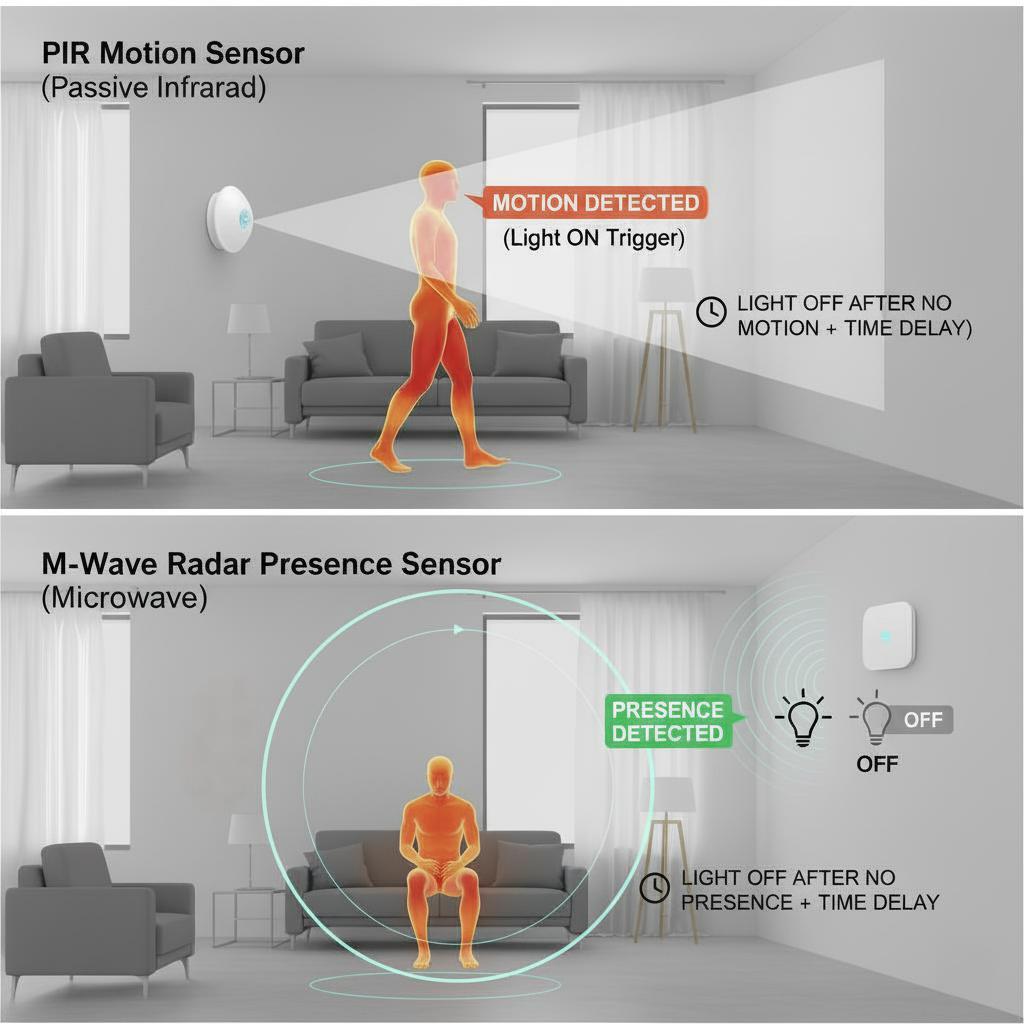
PIR (motion) vs. True Presence (mmWave)
How They See You: A Look at the Tech
There are a few ways sensors work, and each has its own strengths and weaknesses. Click on any of the cards below to uncover the pros and cons of each method.
PIR (Heat Sensor)
Analogy: A heat-sensitive burglar alarm.
mmWave Radar (Wave Sensor)
Analogy: A sonar that detects breathing.
Ultrasonic (Sound Wave)
Analogy: A bat using sound to see the room.
Camera (AI Vision)
Analogy: A security guard trained to spot people.
Power & Connection: The Trade-Off Triangle
The way a sensor talks to your smart home (the protocol) and how it gets power determines what kind of sensor it can be. Fast, powerful sensors need constant power, while slow, simple sensors can run on batteries.
Protocol: How They Talk (Score 1-10)
This chart compares common smart home languages. Notice how low power usually means you need a dedicated "hub" (like a translator).
Power Source Breakdown
The power source is the biggest limitation. True presence sensors (Radar) must be plugged in because constantly sending out radio waves uses too much energy for a small battery.
What About Matter?
Matter is not a protocol (road), it's the universal language (application layer) for the smart home.
Why Matter is Important
Matter is crucial because it solves the biggest problem in smart homes: Compatibility. Before Matter, a device often only worked with its own brand (e.g., Hue bulbs with the Hue bridge). Matter creates one unified language so devices, regardless of brand, can talk directly to Apple Home, Google Home, Amazon Alexa, or Samsung SmartThings.
Simplicity and Future-Proofing
Choosing a Matter-enabled sensor means setup is almost always faster and easier (via a simple QR code), and the device is future-proof. You can switch smart home platforms (e.g., move from Alexa to Apple Home) and your sensors will still work, protecting your investment.
Protocol Comparison Matrix
Beyond speed and power, consider network resilience, data safety, and what happens when the internet goes out.
| Protocol | Supports Matter? | Internet Required? | Data Safety | Approx. Device Limit (Nodes) |
|---|---|---|---|---|
| Wi-Fi | Yes | YES (Most require cloud access to function) | Moderate | ~30-50 devices (Limited by router) |
| Zigbee | No (Uses Bridge) | NO (Operates locally via Hub) | High | ~65,000 nodes |
| Z-Wave | No (Uses Bridge) | NO (Operates locally via Hub) | Very High | ~232 nodes |
| Thread | Yes (Primary) | No/Conditional (Local via Border Router) | High | >250 nodes |
Battery Power
Pros: You can put it anywhere, no outlet needed.
Cons: Must use low-power tech (PIR). Has to "take a nap" often, making it slower and poor for true presence.
Plug-in Power (USB)
Pros: Always on, instant response, perfect for power-hungry Radar.
Cons: You need to find a spare outlet, and a small wire may be visible.
Hardwired Power (In-Wall)
Pros: Invisible, permanent, and guaranteed power.
Cons: Requires professional installation; not suitable for renters or easy repositioning.
Smart Sensor Shopping Guide
When shopping, look past the name! A "motion sensor" is not a "presence sensor." This comparison highlights the key features of popular products.
Key Smart Features:
- Zoning/Tracking: Allows the sensor to divide the room (e.g., detect movement at the "desk" but not the "door").
- Illumination Sensor: Combines motion data with light data. This means the sensor can say, "Someone is here AND it's dark," preventing your lights from turning on during the day. This leads to smarter and more energy-efficient light control.
| Product | Technology | Power | Communication Protocol | Hub Required? (Generally) | Zoning/Tracking | Illumination |
|---|---|---|---|---|---|---|
 Aqara FP2
|
mmWave Radar | Plug-in (USB-C) | Wi-Fi / Matter | No (Connects via Wi-Fi) | Yes (Up to 10 Zones) | Yes (Smart Light Control) |
 Philips Hue Motion
|
PIR (Motion) | Battery (AAA) | Zigbee | Yes (Requires Hue Bridge/Hub) | No (Single Zone) | Yes (Smart Light Control) |
 Sonoff SNZB-06P
|
mmWave Radar | Plug-in (USB-C) | Zigbee | Yes (Requires Zigbee Hub) | No (Single Zone) | Yes (Built-in Light Sensor) |
 LinknLink eMotion Ultra
|
mmWave Radar | Plug-in (USB) | Wi-Fi | No (Connects via Wi-Fi) | Yes (Zone Detection) | Yes (Light Sensor) |
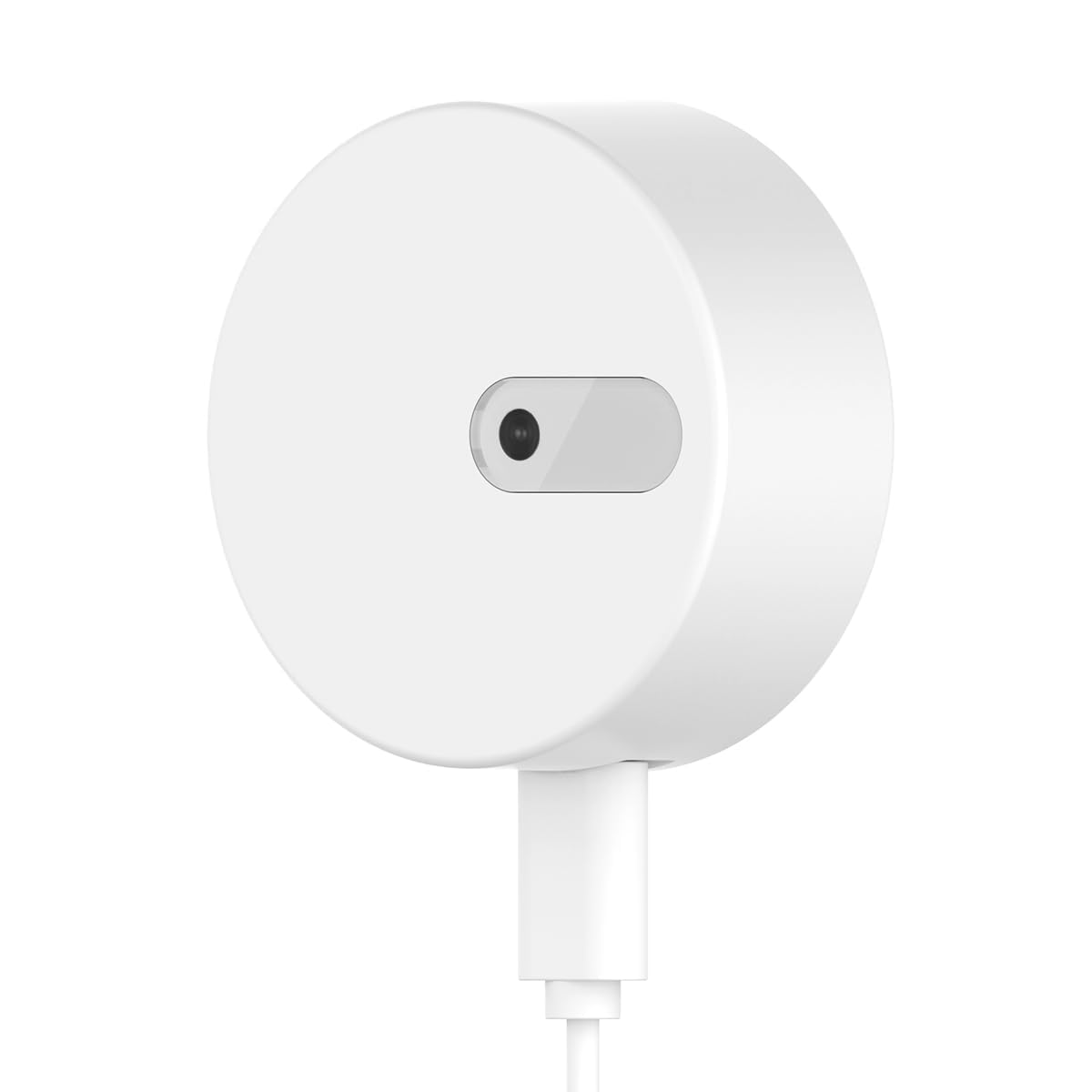 Linptech ES1
|
mmWave Radar | Plug-in (USB) | BLE Mesh | Yes (Requires Bluetooth Gateway) | Yes (Adjustable Zones) | Yes (Illuminance Sensor) |
 Meross MS600
|
mmWave Radar | Plug-in (USB-C) | Wi-Fi / Matter | No (Connects via Wi-Fi) | No (Single Zone) | Yes (Built-in Light Sensor) |
 Zooz ZSE18
|
PIR (Motion) | Battery or USB | Z-Wave | Yes (Requires Z-Wave Hub) | No (Single Zone) | No |
Smart Home Platform Compatibility
Understanding which protocols and standards your smart home devices support helps you choose compatible sensors. Matter is the universal standard that works across all major platforms.
| Platform / Device | Matter | Thread | Zigbee Hub | Z-Wave | Notes |
|---|---|---|---|---|---|
|
🍎
Apple Home (HomeKit)
|
|||||
| HomePod (2nd Gen) | Yes | Yes (Border Router) | No | No | Acts as Thread Border Router. Supports Matter over Thread and Wi-Fi. |
| HomePod mini | Yes | Yes (Border Router) | No | No | Thread Border Router. Matter support via Thread and Wi-Fi. |
| Apple TV 4K (3rd Gen) | Yes | Yes (Border Router) | No | No | Thread Border Router. Matter over Thread and Wi-Fi. |
|
🔵
Google Home
|
|||||
| Nest Hub (2nd Gen) | Yes | Yes (Border Router) | No | No | Thread Border Router. Matter over Thread and Wi-Fi. |
| Nest Hub Max | Yes | Yes (Border Router) | No | No | Thread Border Router. Matter support included. |
| Nest Mini / Nest Audio | Yes | No | No | No | Matter over Wi-Fi only. No Thread support. |
| Nest Wifi Pro | Yes | Yes (Border Router) | No | No | Thread Border Router. Matter over Thread and Wi-Fi. |
|
🔴
Amazon Alexa
|
|||||
| Echo (4th Gen) | Yes | Yes (Border Router) | Yes (Built-in) | No | Built-in Zigbee hub. Thread Border Router. Matter support. |
| Echo Plus (1st & 2nd Gen) | No | No | Yes (Built-in) | No | Built-in Zigbee hub. Older models, no Matter/Thread. |
| Echo Studio | Yes | Yes (Border Router) | Yes (Built-in) | No | Built-in Zigbee hub. Thread Border Router. Matter support. |
| Echo Show 8 (3rd Gen) | Yes | Yes (Border Router) | No | No | Thread Border Router. Matter over Thread and Wi-Fi. |
| Echo Show 10 (2nd Gen & later) | Yes | Yes (Border Router) | Yes (Built-in) | No | Built-in Zigbee hub. Thread Border Router. Matter support. (1st Gen excluded) |
| Echo Show 11 | Yes | Yes (Border Router) | No | No | Thread Border Router. Matter over Thread and Wi-Fi. |
| Echo Dot (5th Gen) | Yes | Yes (Border Router) | No | No | Thread Border Router. Matter over Thread and Wi-Fi. |
| Echo Hub | Yes | Yes (Border Router) | Yes (Built-in) | No | Dedicated hub with Zigbee and Thread. Matter support. |
|
🟣
Samsung SmartThings
|
|||||
| SmartThings Hub v3 | Yes | No | Yes (Built-in) | Yes (Built-in) | Built-in Zigbee and Z-Wave hubs. Matter over Wi-Fi. Most versatile hub. |
| SmartThings Station | Yes | Yes (Border Router) | Yes (Built-in) | No | Zigbee hub + Thread Border Router. Matter over Thread and Wi-Fi. |
| SmartThings Hub (Aeotec) | Yes | No | Yes (Built-in) | Yes (Built-in) | Zigbee and Z-Wave hubs. Matter over Wi-Fi. Official SmartThings hub. |
💡 Quick Tips:
- Matter-enabled sensors work with all platforms above without platform-specific hubs when using Matter over Wi-Fi or Thread.
- Built-in Zigbee hubs (Echo 4th Gen, Echo Plus, Echo Hub, SmartThings hubs) let you connect Zigbee sensors directly without a separate hub.
- Thread Border Routers (HomePod, Apple TV, newer Echo/Google devices) enable Thread-based sensors to work seamlessly.
- SmartThings Hub is the only platform that supports both Zigbee and Z-Wave natively, offering maximum flexibility.
Pick the Right Sensor for Your Room
Based on what you've learned, let's find the best type of sensor for your specific needs. Answer these two quick questions!